

The QR Code field is an advanced field type that allows you to generate a QR code image within the mobile app and is offline capable.
A QR Code (quick response code) is a type of two-dimensional barcode often containing embedded data for a locator, identifier, or link that points to a website or application.
Add a QR Code Field
When designing a Data Entry Form under Advanced Fields, drag ‘n drop or left-click to add a QR Code field to the design.
Once added, select the field in the design preview to edit its properties on the right, such as the Dynamic QR Value that drives the QR image displayed, dynamically or statically.
Configure a QR Code Field
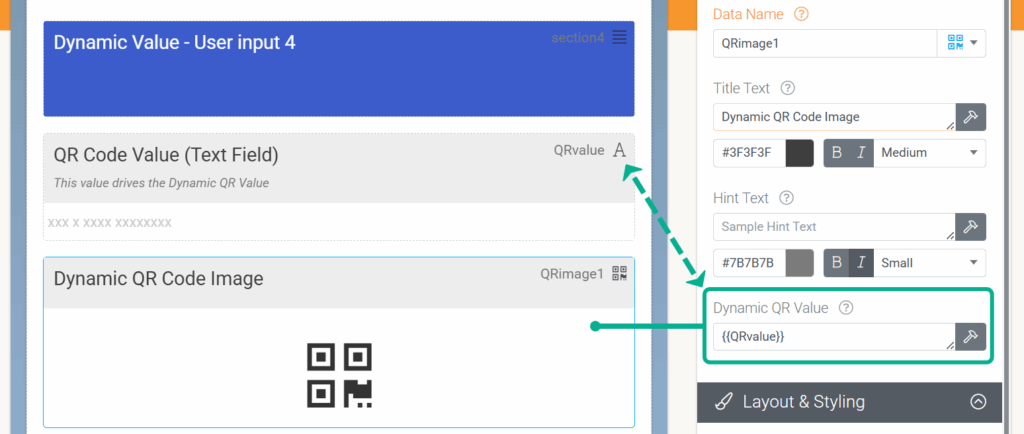
Dynamically
By referencing the data name of another field in your form’s design, you can dynamically drive the QR Code’s value based on user-captured data.
Statically
Websites or links can also be added directly into the field’s Dynamic QR value property to drive the QR image.
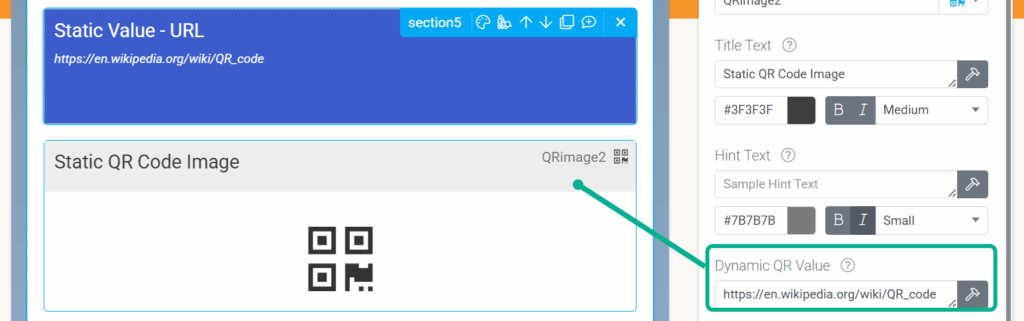
The value you pass into the QR Code field’s “Dynamic QR Value” property is the value that will be returned when the QR code is scanned. You can pass any value to the Dynamic QR Value: a URL, a web address, a string of text, a GUID, numbers, a reference code, etc. You can then search a data source with the value returned from a QR code scan by following the instructions here (Looking Up A Data Source Row from a Barcode Scan).
Unique Properties
Property | Description |
Dynamic QR Value | Specify a static value or a formula that defines the value in the QR Code. |
QR Foreground Color | Select the foreground color of your QR Code once it is generated in the app. |
QR Background Color | Select the background color of your QR Code once it is generated in the app. |
Ensure the Foreground and Background contrast will be compatible with mobile phone cameras and scanners.
Please note that the value of a QR Code field is an image, and its size can be explicitly controlled via custom output template syntax, Image Sizing.