
In the Distill ecosystem, Artifacts serve as the foundational “knowledge base” or “brain” for your query operations. Artifacts are designed to manage unstructured data, such as the vast repositories of text-based information that define your business processes, compliance standards, and technical expertise.

The “Ask” Widget
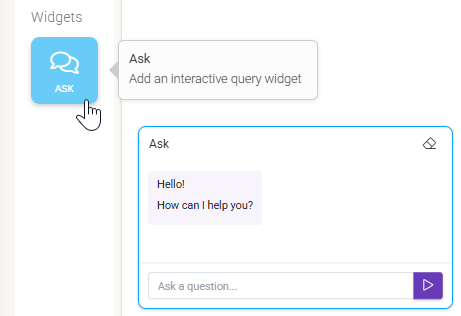
The primary way to interact with your Artifacts is through the “Ask” widget on your Dashboards.
Key features include:
- System Instructions: You can “prime” the Ask Widget by giving it a persona (e.g., “Answer as a senior safety inspector”) to tailor the tone and depth of its responses.
- Scoped Searching: You can limit the Ask Widget’s “search area” to specific Artifact folders, ensuring it only looks at the most relevant manuals or SOPs for a given dashboard.

Artifact Capabilities
Feature | Functional Description |
Content Type | Unstructured data such as PDFs, SOPs, manuals, and project logs. |
Core Utility | Provides the “Source of Truth” for the AI’s RAG-based responses. |
Interaction Point | The “Ask” widget on Dashboards. |
Search Scope | Configurable at the widget level to target specific document folders. |

Management and Ingestion Workflows
Managing your Artifacts library is designed for both speed and organizational flexibility.
Uploading New Artifacts
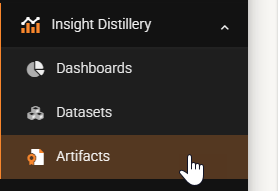
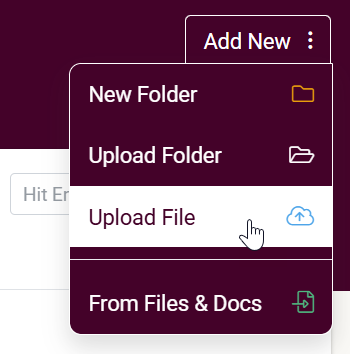
- Direct Upload: Within the Insight Distillery > Artifacts tab, you can simply drag and drop folders of documents (PDFs, .txt, docx) directly into the interface.
- From Files & Docs: You can also migrate existing documentation stored in the Amplus Forms platform by selecting the desired documents in the Files & Docs area and choosing “Send selected Document(s) to Distill.”
Technical Data Processing
Once an Artifact is uploaded, the Distill backend performs several automated steps to prepare it for AI interaction:
- Cleaning & Pre-processing: Extraneous formatting is removed to extract pure text content.
- Intelligent Chunking: Large documents are segmented into smaller, manageable “chunks.” These chunks include overlaps to preserve semantic meaning across artificial boundaries.
- Embedding Generation: Each text chunk is converted into a vector embedding—a high-dimensional numerical representation of its semantic meaning—using Google’s Gemini models.
- Similarity Search: When you ask a question, the system finds the specific chunks in your library that mathematically most closely match your query.
The Role of Artifacts in Retrieval-Augmented Generation (RAG)
Distill utilizes a sophisticated Retrieval-Augmented Generation (RAG) architecture. Instead of relying on general knowledge, the Ask Widget draws on your uploaded Artifacts to formulate answers. This ensures that every response is factually grounded in your specific business context, significantly reducing the risk of “hallucinations” or generic advice.

Data Security and Privacy
Security is integrated into the Artifacts workflow by design:
- Regional Isolation: Traffic remains within your nominated Amplus Forms node (US, EU, Canada or AU), utilizing regional Gemini Pro instances.
- Stateless Processing: AI context is discarded immediately after each interaction is complete.
- Account Isolation: Your Artifacts are strictly isolated to your organization; they are never used to train global AI models.