
A Share Key is a unique access token tied to your dashboard. Instead of giving everyone full access to your Amplus Forms account, you provide a secure link that only shows the specific dashboard you’ve built.
Creating a New Share Key
- Navigate to the Settings of a dashboard.
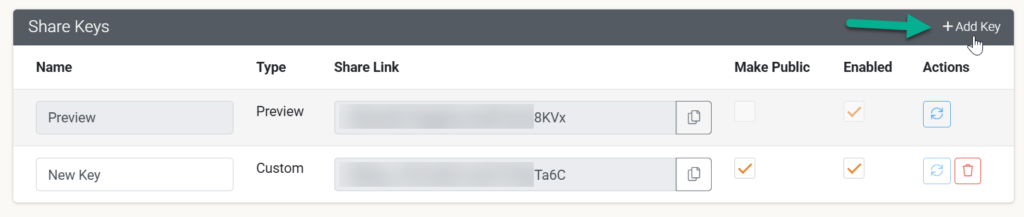
- On the Share Keys tab, click + Add Key.
- Give your key a Name (e.g., “Monthly Safety Report – Management”) so you can identify it later.
Access Levels & Security
Managing your Share Keys allows you to control exactly how your data is accessed and shared. Each key in your list provides the following options:
Feature | Description |
Name | A custom text field to label your key (e.g., “Internal Preview” or “Client Facing”) for easy identification. |
Make Public | A checkbox that, when enabled, allows the dashboard to be viewed by anyone with the link without requiring an account login. |
Enabled | Use this checkbox to instantly activate or deactivate a specific link without deleting it. |
Actions | From here, you can Refresh a link to generate a new URL (invalidating the old one) or Delete the key entirely. |
Managing Your Keys
- Copy to Clipboard: Use the icon next to the Share Link field to quickly copy the URL for distribution.
- Add New Keys: Click the + Add Key button in the top right corner to create additional custom access tokens for different stakeholders.
- Type: The system distinguishes between “Preview” keys (often for temporary internal use) and “Custom” keys created by the user.
Best Practices for Sharing
- Use Unique Keys for Different Groups: Create one key for your Executive team (high-level data) and another for Field Supervisors (operational data). This allows you to revoke access for one group without affecting the other.
- The “Wallboard” Setup: If you want to display your dashboard on a TV in the office, create a dedicated “Public” key with “Make Public” toggled on.
- Audit Regularly: Periodically check your Share Keys list and deactivate any that are no longer in use to keep your business intelligence secure.